Invoicing and payments

Invoicing, appointments and payments in one place

Calendra turns a completed appointment into an invoice, carrying the service, price and client details over from the booking. It supports cash, card, bank transfer and online payments.

Calendra turns a completed appointment into an invoice in a few clicks, because the service, price and client details carry over from the booking. It supports cash, card and online payments, and with the fiscal cash register add-on it also handles fiscal verification under Slovenian law.

  • Invoice from an appointment with no re-entry
  • Deposits and prepayments at booking time
  • Fiscal verification through the Fiscal cash register add-on

How businesses bill for services

Billing differs mainly by when the customer pays and whether payment is a condition for the booking.

Payment on site after the service

The most common case in salons and health services. When the appointment ends, the employee opens it, confirms the services delivered and issues the invoice. The amount and the client are already filled in, so invoicing takes a few clicks instead of a fresh data entry.
Prepayment at booking

Where last-minute cancellations mean lost revenue, you can require a deposit or full payment at booking. The appointment is only confirmed after successful payment, which substantially reduces no-shows.

Packages and prepaid visits

A customer buys a package of visits and uses it over time. Each visit is deducted from the package and the remaining balance is visible on the client profile, with no separate spreadsheet to maintain.

A company as the payer

With business clients the payer is the company rather than the person who attended. The invoice is issued to the company's details while the appointment stays linked to the individual who received the service.

What unified billing gives you

No duplicate data entry

Details captured at booking are reused on the invoice. Less retyping means fewer mistakes in amounts, names and tax numbers.

A revenue picture you can act on

Because appointments and invoices are linked, you can see which services generate the most revenue and how much is outstanding, not just how many appointments happened.

Compliance with Slovenian rules

With the Fiscal cash register add-on (9.90 EUR per month) Calendra supports the fiscal verification of invoices that Slovenian law requires for cash payments.

A separate invoicing program compared with Calendra

A calendar plus a separate invoicing program works, but it requires entering every detail twice.

What we compareCalendar plus separate invoicing programCalendra
Entering client detailsOnce in the calendar, again in the invoicing program.Once at the first booking, reused from then on.
Linking an invoice to an appointmentManual lookup of which invoice belongs to which visit.The invoice is attached to the appointment and client profile.
Prepayment at bookingNot possible without an extra payment tool.A deposit or full payment can be a condition for confirmation.
Revenue by serviceRequires merging two data sources by hand.Reporting comes from the same records the appointments created.
Fiscal verificationA separate fiscal register or external service.The Fiscal cash register add-on works inside the same system.
Preparing data for accountingExport from two systems and reconcile manually.One export of invoices and payments for the period.

From appointment to paid invoice

  1. 1

    The appointment already carries the selected services, prices and client details.

  2. 2

    After delivery you confirm what was actually done and adjust if needed.

  3. 3

    Calendra prepares the invoice, with fiscal verification where required.

  4. 4

    The payment is recorded and invoice and appointment stay linked on the client profile.

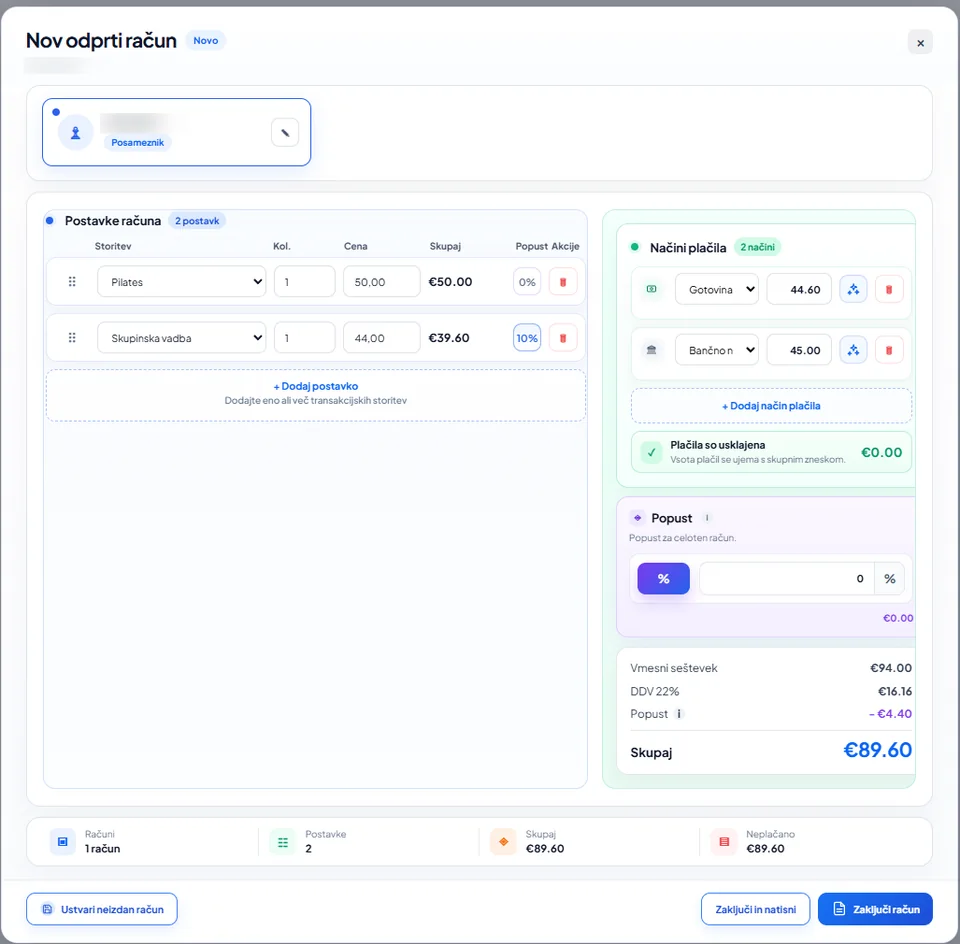
Open invoice in Calendra with two line items, a discount, multiple payment methods and the final total
Services, discounts and multiple payment methods managed in one billing view.

How billing works in practice

Does Calendra support fiscal verification of invoices?

Yes, through the Fiscal cash register add-on, available on every plan for 9.90 EUR per month. It covers the fiscal verification of invoices that Slovenian law requires for cash transactions. If you only invoice for bank transfers, you do not need the add-on.

Which payment methods are supported?

Cash or card on site, bank transfer and online payment through a connected provider. For each service you can decide whether online payment is optional, recommended or required to book.

How do deposits and prepayments work?

On a service you set a percentage or fixed amount the customer pays at booking. The appointment is confirmed after successful payment and the amount is deducted from the final invoice. Online payments are available from the Professional plan onwards.

Can I hand data over to my accountant?

Yes. Invoices and payments for a chosen period can be exported and passed to your accounting service, without copying figures from a calendar into a spreadsheet.

Invoicing and payment questions

Does Calendra support fiscal verification of invoices?

Yes, through the Fiscal cash register add-on at 9.90 EUR per month, available on all three plans and covering fiscal verification under Slovenian law.

Can I require payment before a booking?

Yes. On each service you can set a deposit or full payment as a condition for confirming the appointment. Online payments are included from the Professional plan onwards.

Is an invoice linked to its appointment automatically?

Yes. The invoice is created from the appointment, so both stay linked on the client profile together with the services delivered and the recorded payment.

Which currencies and tax rates are supported?

Calendra targets the Slovenian market and works in euros. Tax rates are configured per service, which allows different rates for different service types.

What happens if a customer cancels a paid appointment?

The slot is released and the payment stays recorded, so you can refund it, move it to a new appointment or retain it according to your own cancellation terms.

Connect appointments and billing

The free trial lasts 14 days and requires no credit card. The Fiscal cash register add-on can be switched on at any time later.

Start free