Client management

Client management and appointment records

A client profile in Calendra brings together contact details, the full appointment history, notes, documents, issued invoices and custom fields, with access controlled by employee role.

A client profile in Calendra brings contact details, the full appointment history, notes, documents, issued invoices and custom fields together in one place. At every following booking you can see past services and agreements, so there is no need to search notebooks, email or messages.

  • Complete appointment and invoice history
  • Notes, documents and custom fields
  • Access limited by roles and permissions

Where client records matter most

Organised records pay off most in services where what happened at the last visit matters.

Hair colouring and beauty treatments

The colour formula, processing time, products used and how the client reacted go into the notes. At the next visit nothing has to be guessed, even if a different stylist takes over, which is often the difference between a returning and a lost client.
Physiotherapy and health services

Treatment history, referrals and findings stay on the client profile. Because access is role-based, sensitive notes are visible only to the staff who need them to deliver the service.

Returning consulting clients

Before each session you can review notes from the previous one, agreed actions and documents already sent, without digging through email and separate folders.

Spotting repeat no-shows

Because cancellations and no-shows are recorded in the history, you can see before confirming whether this is a client for whom requiring a prepayment makes sense.

What organised client records enable

Context at the right moment

Everything relevant to delivering the service is visible when the appointment is opened, instead of being spread across notebooks, chat messages and one employee's memory.

Data that stays with the business

When an employee leaves, the client history stays in the company's system. With records kept in personal phones or notebooks that is often not the case.

A basis for GDPR compliance

Data sits in one place with controlled access, which makes it far easier to answer a request for access, correction or erasure of personal data.

Excel and notebooks compared with Calendra

A client spreadsheet is usually the first step beyond a notebook, but it is not connected to the calendar and has no concept of permissions.

What we compareExcel or a notebookCalendra
Link to appointmentsVisit history has to be looked up by date by hand.Every past and upcoming appointment sits on the client profile.
Several employees at onceThe file lives with one person or exists in several versions.Everyone sees the same record and edits are tracked.
Sensitive notesVisible to anyone who can open the file.Roles and permissions restrict access to the staff who need it.
Finding a clientDepends on consistent entry and spelling.Search by name, phone, email or service.
A request to erase dataData may exist across several files and copies.One record that can be edited or anonymised.
An employee leavingPart of the client knowledge leaves with them.The records stay in the company's system.

How a client profile is created and grows

  1. 1

    The client is created automatically at the first online booking, or manually during a call.

  2. 2

    Every later appointment attaches to the same profile without re-entry.

  3. 3

    Employees add notes, documents or custom field values while delivering the service.

  4. 4

    Invoices, payments and sent notifications collect themselves in the client history.

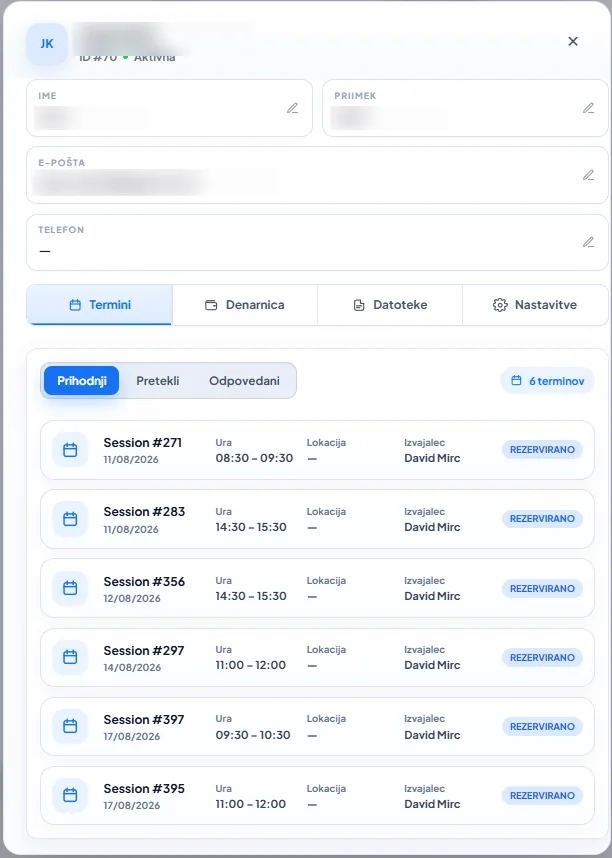
Calendra client profile with appointments, wallet, files and settings tabs plus a list of upcoming bookings
A client profile connects contact details, appointments, benefits and documents.

How client records work

Who can see client data?

Access is set by roles and permissions. Reception typically sees contact details and appointments, while the provider also sees the professional notes they need. Sensitive categories can be restricted to a narrower group of staff.

What can custom fields capture?

Custom fields cover data specific to your trade: the colour formula used, allergies, equipment size, a referral number or the channel the client came from. That keeps this information out of a separate spreadsheet.

Can I import an existing client list?

Yes. An existing spreadsheet list can be imported into Calendra so history and contact details do not start from zero. It is worth removing duplicate entries before importing.

How does this relate to GDPR and consent?

Data is processed on the business's instructions as controller, with Calendra acting as processor. Because records sit in one place, a request for access, correction or erasure can be handled without searching multiple systems.

Client management questions

What can I migrate from CSV?

Client import supports a contact preview, row validation and duplicate review before confirmation. Check the name, surname, email, phone and language mapping before importing. Contact import does not automatically migrate appointment history, invoices, passes or clinical records; discuss a broader migration during a demo.

Can I import existing clients from Excel?

Yes. A client list from a spreadsheet can be imported into Calendra so contact details and history are available immediately. Removing duplicates before importing is recommended.

Can I restrict who sees a client's notes?

Yes. Roles and permissions determine which employees can view or edit particular data, so sensitive notes can be limited to a narrower group of staff.

What are custom fields and when are they useful?

Custom fields are additional profile fields for data specific to your trade, such as a colour formula, allergies or a referral number.

Can clients see their own data?

Through the Calendra Connect app clients see their appointments, notifications and payments. Internal professional notes written by staff are not visible to them.

How do I handle a request to erase personal data?

Because the data is in one record, it can be deleted or anonymised, except where retention is required by accounting, tax or legal obligations.

Get your client records in order

The free trial lasts 14 days and requires no credit card. An existing client list can be imported from a spreadsheet.

Start free