SMS and email reminders

SMS and email appointment reminders

Calendra automatically sends a confirmation when a booking is made and a reminder before the appointment, by SMS or email. Every message includes a link to reschedule or cancel.

Calendra automatically sends a confirmation when a booking is made and a reminder before the appointment by SMS or email, with the timing set by you. Messages can include a rescheduling or cancellation link within your booking rules, which reduces missed appointments and frees the slot for another customer.

  • Confirmations, reminders, changes and cancellations without manual work
  • You choose the channel and how far ahead they are sent
  • Self-service reschedule and cancellation links

When reminders pay off most

A reminder is worth roughly what an empty slot costs. These are the cases where the difference is largest.

Long, high-value services

A colour service or an extended treatment occupies two hours that cannot be recovered after a no-show. A reminder the day before gives the client enough time to tell you about a change, and gives you enough time to offer the slot to someone else.
Appointments booked weeks ahead

Appointments agreed a month or more in advance are the most likely to be forgotten. A confirmation at booking combined with a reminder 24 hours before substantially reduces no-shows.

Group classes with limited capacity

If someone who signed up does not arrive and says nothing, the place stays empty even though others were on the waiting list. A reminder with a cancellation link frees the place early enough for the system to offer it on.

A new client's first visit

New clients miss appointments more often than regulars. A confirmation with the address, time and arrival instructions removes uncertainty and the chance of the appointment quietly falling through.

What automatic reminders change

Fewer empty slots

A reminder will not prevent every cancellation, but it does make sure you hear about them early enough to fill the slot with another client.

No manual sending

Messages are built from the appointment data and sent at the configured time, including weekends and the busiest days, when manual sending would be the first thing to slip.

Less phone coordination

A reschedule or cancellation link hands the change back to the client, which cuts down calls and coordination in the middle of the working day.

Manual notifications compared with Calendra

Sending messages by hand works with a few appointments a day, but it is the first thing to fail when you are busiest.

What we compareManual messages or callsCalendra
ConsistencyDepends on how much time is left between appointments.Every appointment gets the same notifications under the same rules.
TimingWhenever someone remembers.Exactly at the configured time before the appointment.
Message contentSlightly different each time, often without address or instructions.A template with the service, employee, time and location.
Client-initiated cancellationA call during opening hours, otherwise an unconfirmed message.A link in the message that frees the slot immediately.
TraceabilityNo record of whether a message was sent.Sent notifications are recorded in the appointment history.
CostStaff time that could have gone to clients.Email is included; SMS is charged at the published rate.

How a notification is built and sent

  1. 1

    You choose the active templates, the channels and how far ahead to send.

  2. 2

    Calendra detects a new booking, a reschedule or a cancellation.

  3. 3

    The message is assembled from the appointment, service, employee and location.

  4. 4

    The client receives it with reschedule and cancellation links, and the sent notification stays in the history.

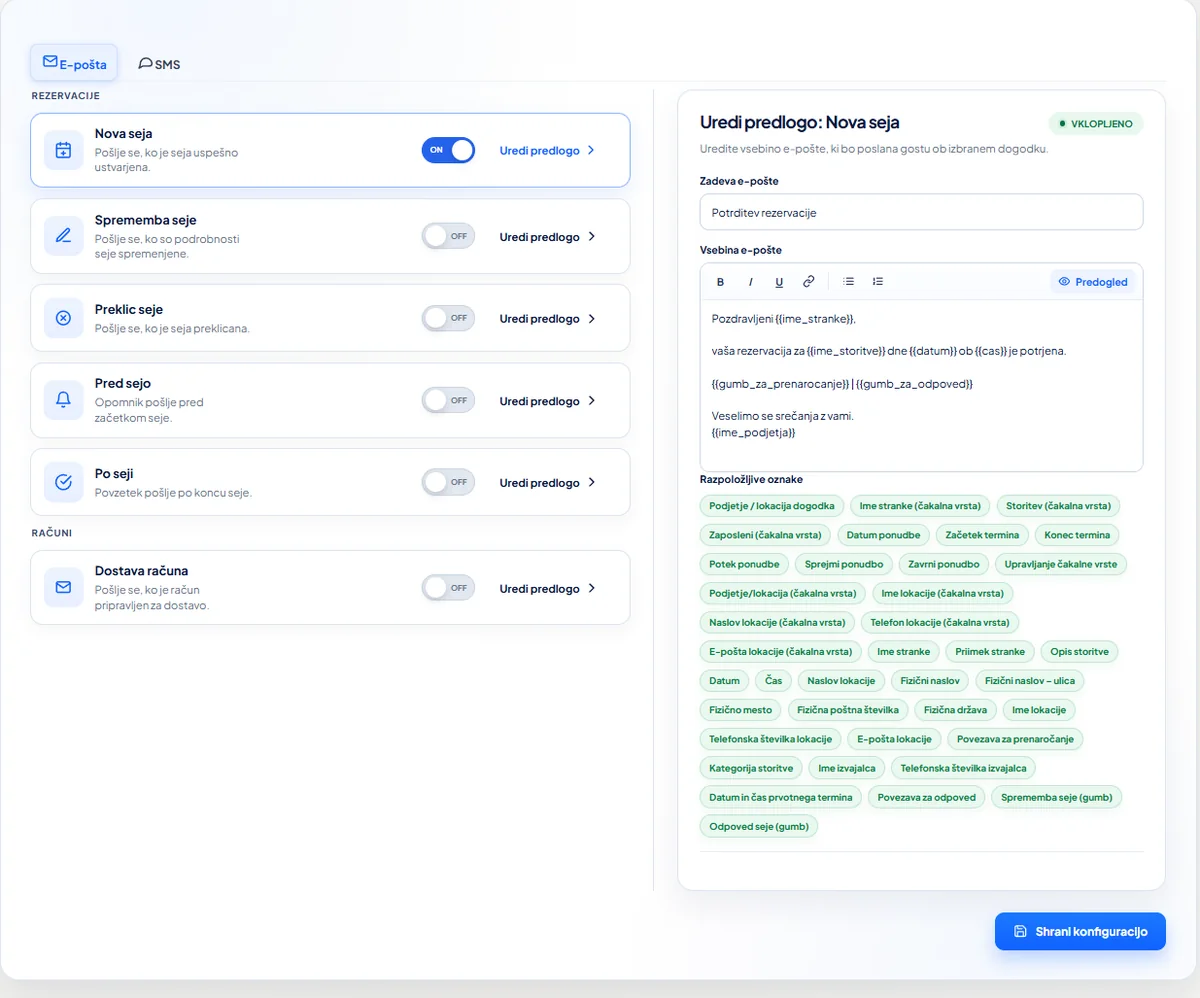
Calendra notification settings with email templates for new bookings, changes, cancellations, reminders and invoice delivery
Edit email and SMS templates and enable only the events your workflow needs.

How reminders work

When is the reminder sent?

You set the timing. The most common choice is 24 hours before, which leaves enough time to reschedule while keeping the appointment close enough to remember. For longer or higher-value services, a reminder one week and one day before is a common combination.

SMS or email: which should you use?

Email is included and suits confirmations with more detail, attachments or instructions. SMS has a considerably higher read rate and is the better choice for the reminder immediately before the appointment. Many businesses use both: email to confirm, SMS to remind.

How much do SMS messages cost?

SMS and email reminders are included from the Professional plan onwards, and SMS usage is charged per message at the rate shown in the pricing configurator. Because the per-message price is visible, the monthly cost can be estimated from your appointment volume.

Can I change the message wording?

Yes. Templates can be edited and can include the client, service, employee, location and appointment time. That keeps messages in your own tone and carrying exactly the information your clients need.

Reminder questions

When does Calendra send a reminder?

You choose the timing. The most common setting is 24 hours before the appointment, while longer services often use a reminder one week and one day before.

Are SMS reminders included in the plan price?

SMS and email reminders are included from the Professional plan onwards. SMS usage is charged per message at the rate shown in the pricing configurator.

Can a client cancel from the reminder?

Yes. Every message can carry a secure reschedule or cancellation link. The slot is released immediately, and you set the rules for how late a cancellation is allowed.

Can I edit the reminder text?

Yes. Message templates can be edited and can include the client, service, employee, location and appointment time.

What happens if a client gives no phone number?

If no phone number is available, the notification is sent by email. Which fields are required at booking is configured in your booking settings.

Cut down on missed appointments

The free trial lasts 14 days and requires no credit card. You can switch reminders on and test them on your own appointments.

Start free