Appointment calendar

Appointment calendar for service businesses

Calendra brings appointments for every employee, service and room into one calendar that automatically checks working hours, absences and existing bookings before confirming anything.

The Calendra appointment calendar shows appointments for every employee, room and service on one screen. Each booking automatically checks working hours, absences and existing appointments, to help prevent scheduling conflicts. Daily, weekly and monthly views are available, along with recurring appointments.

  • Daily, weekly, work-week and monthly views
  • Availability across employees, rooms and equipment
  • Recurring appointments and group bookings

How service businesses use the calendar

Every trade has a different rhythm. These are the four most common patterns among Calendra customers.

A salon with four stylists and two treatment rooms

The manager sees all four schedules side by side in the weekly view. When a customer books a 120-minute colour service, Calendra reserves both the stylist and the room for the full duration and removes that interval from the online availability. A wash station or dryer can be tracked as a separate resource when it is the bottleneck.
A physiotherapist with different treatment lengths

A first assessment takes 60 minutes, a follow-up 30. Each service carries its own duration plus optional preparation or cleanup time that Calendra adds automatically, so consecutive appointments never overlap and nobody has to shift bookings by hand.

A gym running group classes

A group class has limited capacity. Calendra counts sign-ups, closes the class when it fills and maintains a waiting list. The class appears in the calendar as a single event with its attendee list rather than ten separate bookings.

A consultant with recurring sessions

Monthly sessions for a whole year are created as one series. A single session can be moved without touching the rest, or every future session can be updated at once when the arrangement changes.

What the calendar solves

Double bookings become impossible

Availability is calculated from working hours, absences, holidays, existing appointments and the selected resources. A slot a customer sees online is therefore genuinely free.

One record instead of three

Instead of a diary at reception, a calendar on a phone and a spreadsheet for billing, you keep one record that also drives reminders, invoices and client history.

Visible utilisation

The calendar immediately shows which days and which employees carry the most empty slots, which is a practical basis for schedule, promotion and hiring decisions.

Paper diary and Excel compared with Calendra

Most businesses use a notebook, Google Calendar or Excel before Calendra. Each works fine until the first last-minute cancellation.

What we compareNotebook, Google Calendar or ExcelCalendra
A booking request in the evening or on a holidayThe customer leaves a message and you confirm on the next working day.The customer books at any hour and the confirmation is immediate.
Checking availabilityYou compare employee schedules and room usage manually.The system checks the employee, room and equipment before confirming.
Cancellation or reschedulePhone coordination, and the freed slot often stays empty.The customer uses the link in their message and the slot is released automatically.
Reminders before an appointmentSent by hand, or not sent at all.SMS or email goes out automatically at the configured time.
Client historySpread across a diary, chat messages and staff memory.Every past appointment, note and invoice sits on the client profile.
Preparing an invoiceDetails are retyped into a separate program or form.Service, price and client carry over from the appointment.

From booking to delivery

  1. 1

    A customer or employee creates an appointment on the web, in the app or in the calendar.

  2. 2

    Calendra checks working hours, absences, existing appointments and the required resources.

  3. 3

    The appointment appears for the whole team and triggers the confirmation and reminder.

  4. 4

    After delivery it stays in the client's history as the basis for the invoice and reporting.

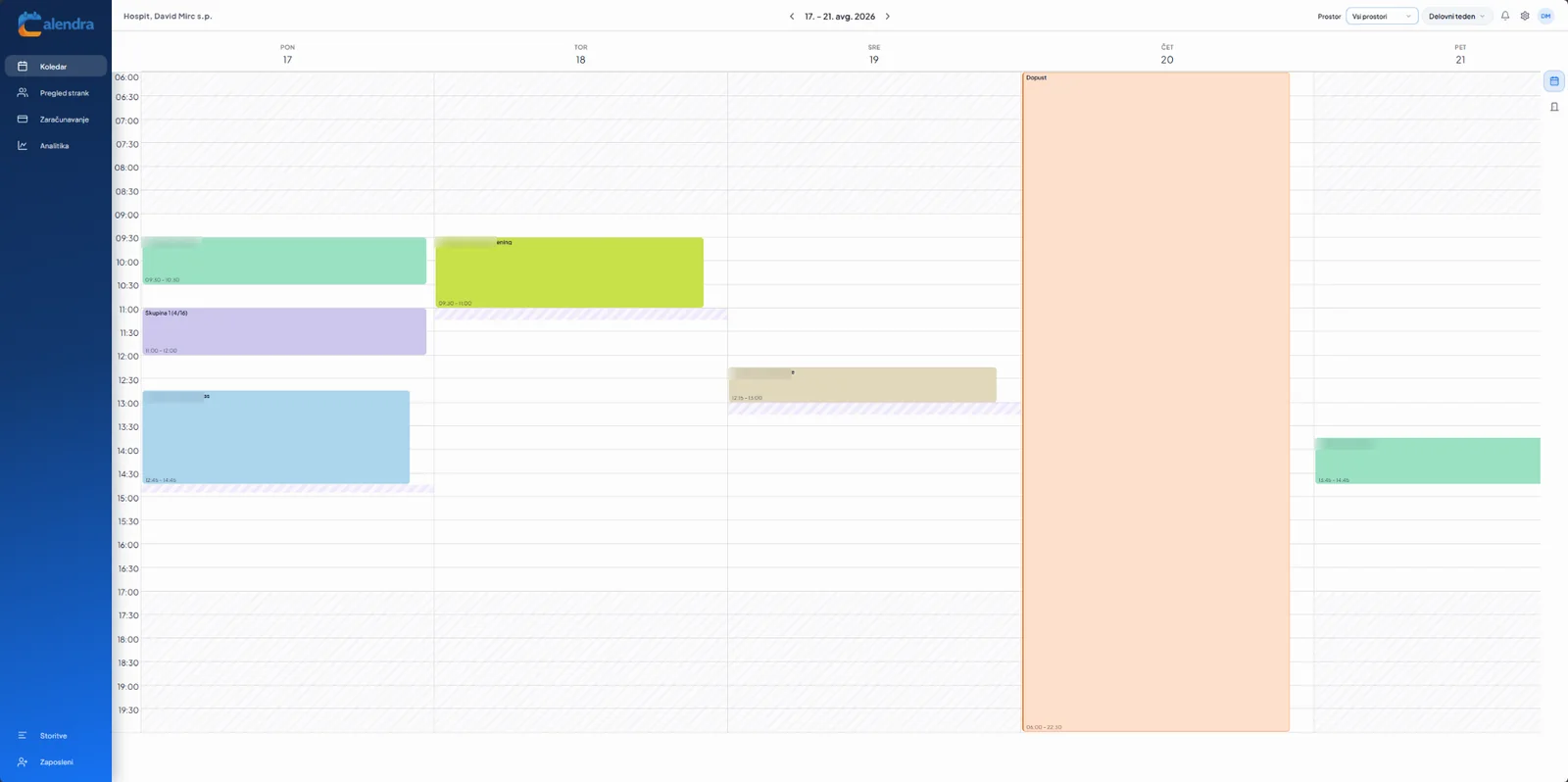
Weekly appointment calendar view in Calendra showing several employees' appointments with labelled services and free slots
The weekly view with employee schedules side by side.

How the calendar works in detail

How does Calendra calculate free slots?

It starts from the employee's working hours, then subtracts absences, existing appointments, the selected service's preparation and cleanup time and any required room or equipment. Only the remaining intervals are offered, so what a customer sees matches what is actually available.

Can each employee edit only their own calendar?

Yes. Roles and permissions decide whether an employee sees and edits only their own appointments or the whole team calendar. Reception typically gets the full overview while a provider sees only their own schedule.

How does the calendar handle rooms and equipment?

A room, treatment booth, chair or device can be tracked as a resource that a service requires. An appointment is only confirmed when the employee and the required resource are both free, which prevents two treatments in the same room.

Does the calendar sync with Google Calendar?

Yes. The Google Calendar integration shows Calendra appointments in an employee's personal or work calendar, and commitments from Google Calendar can be taken into account when calculating availability.

Appointment calendar questions

Does Calendra prevent double bookings?

Yes. Every booking checks working hours, absences, existing appointments and the availability of the employee and required rooms, so two appointments cannot occupy the same resource.

Which calendar views are available?

Daily, weekly, work-week and monthly views are available. The daily and weekly views show several employees' schedules side by side.

Can I manage appointments for multiple locations?

Yes. Several branches can be managed from one account, each with its own working hours, employees and rooms. Multi-location support is included in the Premium plan.

How do I set up recurring appointments?

Create the appointment as a series with the interval you need. When editing, you choose whether the change applies to that occurrence only or to all future appointments in the series.

Are appointments deleted after a cancellation?

A cancelled appointment frees the slot in the calendar but stays in the client's history with a cancelled status, so repeated no-shows are visible at the next booking.

Try the calendar on your own appointments

The free trial lasts 14 days and requires no credit card. Setting up services, employees and working hours usually takes under 15 minutes.

Start free